06 March 2016

How to fix slow SSD performance on Windows 10

So I ran Crystal Disk benchmark on my Samsung 850 EVO SSD and it was crawling like a boneless snail. After some googling, I realized my Windows 10 was still running on IDE mode and all we have to do is change it to AHCI, which is basically a faster mode of operation than the legacy IDE. To do that:
  1. Right click the Start Menu/Windows icon (on the left bottom of your screen)
  2. Choose Command Prompt (Admin) option from the menu
  3. Type the following command and press Enter to boot Windows on Safe Mode
    bcdedit /set {current} safeboot minimal
  4. Restart the computer
  5. Enter your BIOS during boot up (by pressing DEL, F2 or F10 key - depending on your hardware)
  6. Go to "Advanced" tab and enter "SATA/Storage/HardDrive Configuration"
  7. Set the "Storage Controller" option to "AHCI" mode and if there is "Marvell Storage Controller", set it to "AHCI" as well
  8. Press "Esc" on your keyboard, then select "Save changes and exit" option
  9. If everything goes fine, Windows 10 will launch in Safe Mode and we've successfully activated AHCI
  10. Now right click the Start Menu/Windows icon and select "Command Prompt (Admin)" again
  11. Type the following command and press Enter to turn off the Safe Mode booting
    bcdedit /deletevalue {current} safeboot
  12. Restart the computer and go do your thing
:
Before (in IDE mode)

After (in AHCI mode)
And just like that we have doubled the performance of our SSD!? Well, technically this is the expected performance but since we were stuck with some legacy grandma walking stick support, it was sort of suffering to run. There are some other methods to do the same, which involves registry editing and stuff but this is a much safer method. Hope that helps.

28 February 2016

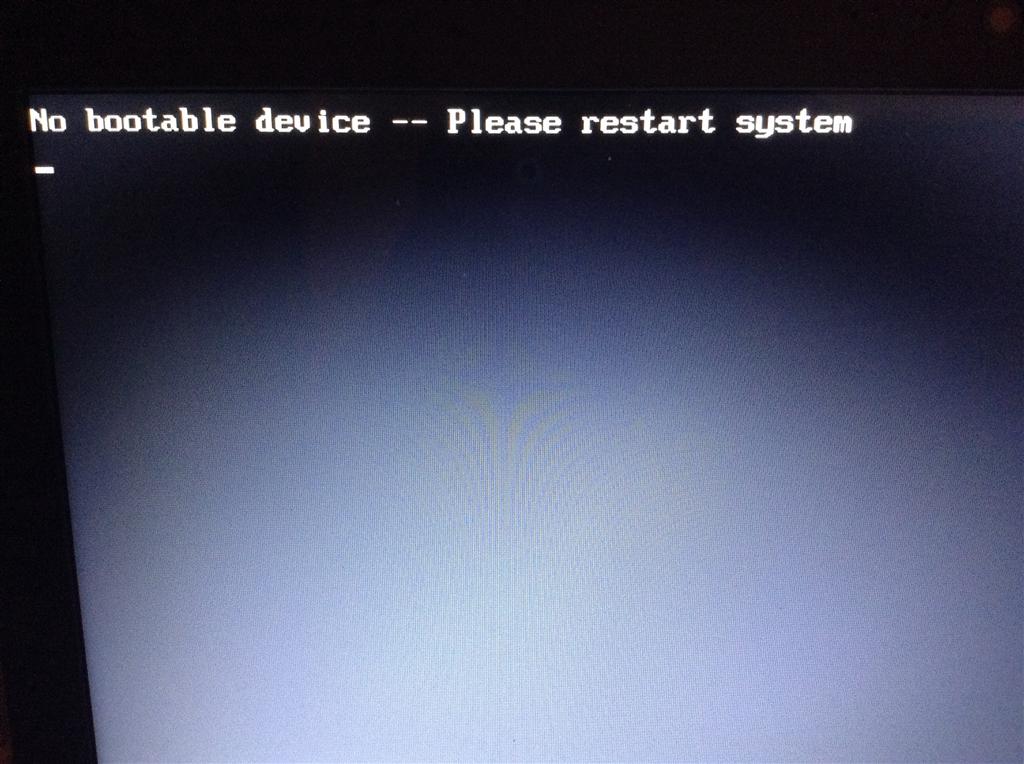
Fixing “No bootable device” error when booting ColudReady on legacy Intel motherboards

I was able to install Neverware CloudReady on my hard drive without errors, but when I plug out the installer USB and try to boot the OS, I was getting a "No bootable device -- insert boot disk and press any key" error. After tons of googling, apparently my legacy Intel Desktop Board does not support GPT well, so we'll have to manually set the Protective Master Boot Record (PMBR) flag using parted the utility.

To do this, you’ll need access to command line/terminal. You can use just about any Linux Live CDs (including Ubuntu's) but I personally went for the System Rescue CD. After installing CloudReady on your harddrive as usual, boot from the live CD and enter the following into the terminal:

parted /dev/sda disk_set pmbr_boot on
Reboot the machine and should be able to boot from your Chromium OS. I spend solid 3 days trying figure this out and my OCZ Agility 3 died in the process, hopefully you'll find this useful.

27 December 2012

Installing Varnish, Lighttpd, VSFTP, PHP and APC on CentOS 6.3

Installing & Configuring Lighttpd

yum update
rpm -Uhv http://pkgs.repoforge.org/rpmforge-release/rpmforge-release-0.5.2-2.el6.rf.x86_64.rpm
yum install lighttpd
yum install lighttpd-fastcgi

Installing PHP & APC

yum install php
yum install php-pecl-apc

Installing & Configuring VSFTP

yum install vsftpd
vi /etc/vsftpd/vsftpd.conf
Change the configuration as below:
anonymous_enable=NO
local_enable=YES
write_enable=YES
connect_from_port_20=NO
chroot_local_user=YES
local_umask=022
userlist_file=/etc/vsftpd/user_list
userlist_enable=YES
userlist_deny=NO
Save the the file. Then create a new user "ftpuser" to be able to login via SFTP.
useradd -d /srv/www/lighttpd -s /usr/sbin/nologin ftpuser
passwd ftpuser
chown -R ftpuser/srv/www/lighttpd
chmod 775 /srv/www/lighttpd
groupadd ftpusers
usermod -Gftpusers ftpuser
And now add new line, "ftpuser" to the user list
vi /etc/vsftpd/user_list
ftpuser

If you're get 500 OOPS permission denied error

vi /etc/shells
/usr/sbin/nologin

If you're getting 503 Login incorrect error

vi /etc/pam.d/vsftpd
#%PAM-1.0
session optional pam_keyinit.so force revoke
auth include system-auth
account include system-auth
session include system-auth
auth required pam_listfile.so item=user sense=deny file=/etc/vsftpd/ftpusers onerr=succeed
auth required pam_shells.so
session required pam_loginuid.so

If you're getting 403 Forbidden for PHP files

 vi /etc/lighttpd/lighttpd.conf
fastcgi.server = ( ".php" => ((
                    "bin-path" => "/usr/bin/php-cgi",
                     "socket" => "/tmp/php.socket"
              )))
server.modules              = (
           "mod_access",
           "mod_accesslog",
           "mod_fastcgi",
           "mod_rewrite",
           "mod_auth"
)

Installing & Configuring Varnish

rpm --nosignature -i http://repo.varnish-cache.org/redhat/varnish-3.0/el5/noarch/varnish-release-3.0-1.noarch.rpm
yum install varnish
vi /etc/lighttpd/lighttpd.conf
server.port = 6081
vi /etc/sysconfig/varnish
VARNISH_LISTEN_PORT=80
vi /etc/varnish/default.vcl
.port = "6081";

Unblock port 6081 on APF Firewall, if you have one in the first place

vi /etc/apf/conf.apf
IG_TCP_CPORTS="6081,...."
/etc/init.d/apf restart

23 January 2010

1 week in the wild - Exoot MapleCity Lite

More than one hundred thousand game plays in just one week! OMG, thats awesome! And I think this is my most successful game I have ever created before. However the revenue this game generated is less than $3 USD. Due to low eCPM my revenue is badly affected and I wonder why this game getting hell of alot traffic from China and Taiwan instead of America (according to MochiMedia)


Recently, Im getting lots of feed back from users, especially those from Kongregate. Most of them were not really satisfied with the game play and their appetite for flash game has grown so much...They expect more form the game like more maps, more monsters, more and more!!

A picture is worth a thousand words. Here's an image from MochiBot.com showing MapleCity Lite's current statistics.


ExootLabs.com
Oh ya we have moved to a new domain and server. Visit us at http://www.exootlabs.com/ and lots of features under the hood..so stay tuned!

17 January 2010

getURL in ActionScript 3 (navigateToURL)

One of the things that has become something of a pain in AS3 is getURL. If you’ve used ActionScript 2 before, you know how simple it is to open a URL in a web browser.

getURL("http://www.google.com");

In AS3, however, it gets a bit more complicated.
You have to declare your URLRequest. This is pretty much a fancy way of holding the URL. You may wonder, why you need a URLRequest to hold the URL when you could just use the string itself? Well the answer is because you can use the same URLRequest with many different functions. And there are special properties to a URLRequest.
This is how you declare a URLRequest:

var url:URLRequest = new URLRequest("http://kornesh92.blogspot.com");
The URLRequest by itself is useless, but coupled with navigateToURL, it’ll act like getURL.

This is the full code:
var url:URLRequest = new URLRequest("http://kornesh92.blogspot.com");
navigateToURL(url);
Put that in the first frame of your movie and when you compile it, this blog should open up in your browser.

16 January 2010

AS3 FPS Display Class

You can display your current FPS(Frame Per Second) during games.
Save as FPSTimer.as.

package{
import flash.events.Event
import flash.events.TimerEvent
import flash.text.TextField
import flash.utils.Timer

public class FPSTimer extends TextField{
private var fps:int = new int();
private var t:Timer = new Timer(1000);

public function FPSTimer():void{
t.start();
addEventListener(Event.ENTER_FRAME, onEnter);
t.addEventListener(TimerEvent.TIMER, onTimer);
}
private function onEnter(e:Event):void{
fps++;
}
private function onTimer(e:TimerEvent):void{
text = String(fps);
fps = 0;
}
}
}
Using the FPSTimer.as is easy. Just add it to your Sprite,MovieClip or stage like this:

addChild(new FPSTimer()) 
and it’ll display the FPS. Simple as that.

How to Monetizing a Flash Game

1) Sign up to MochiAds. This company allows you to ake money from every game play and offers some more interesting services such as leaderboards, link tracking, and so on..


2) Sign up to MochiBot, a free service to determine Flash games popularity


3) Sign up to FlashGameLicense, the place to buy and sell Flash games. Read a review about this service here
4) Think about a game design idea. The more original, the better. If you have no ideas, copy successful games.
5) Make your game…The most part of the whole process
6) Once you think it’s finished encrypt it. You can use the MochiAds free encrypter.
7) Add MochiAds ads and MochiBot stats
8) Submit your game to a developers forum or take a look at First Impression service by FlashGameLicense, to get some qualified reviews about your game. Remember to sitelock your game to prevent it to spread without your control. If you don’t know how to sitelock a game, read how to sitelock a flash movie
9) Now that your game should be really finished, submit it to FlashGameLicense
10) Wait at least two weeks
11) At this time if you found a sponsor, distribute the game according to the partnership you signed. If you did not find any sponsor, return to step 10 or proceed to 12
12) Sumit your game to as much portals as you can. For a faster distribution, try FlashGameDistribution. Read a review about this service here
13) Improve and fix game bugs, interface, etc...